
Move your Shopify catalog into WooCommerce in an afternoon.
Shop2Woo reads products straight from Shopify's own JSON feed and writes them into WooCommerce with images, variants, and descriptions intact. No developer, no CSV exports, no copy-pasting SKUs by hand.

Here's 3 Simple Steps to Import Shopify Product via JSON File
Most migration plugins ask you to wrestle with CSV exports and manual field mapping. Shop2Woo skips that by reading the same JSON feed Shopify already exposes.
Export Your Shopify Products as JSON
Start by exporting your product data from Shopify using the Shopify API in JSON format: your-store.myshopify.com/products.json?limit=250&page=1. The plugin supports up to 250 products per request, and pagination handles larger catalogs automatically, batch by batch.

Set Up WooCommerce REST API Keys
Generate REST API keys in your WordPress dashboard under WooCommerce settings. These keys secure the connection between Shopify and WooCommerce, and the plugin walks you through creating them with the right permissions.
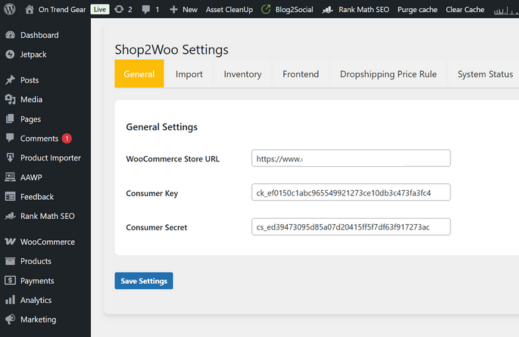
Import Products into WooCommerce
Import your Shopify products into WooCommerce with a single click. The plugin transfers images, descriptions, and variations, mapping everything to WooCommerce fields. Run it again later and it updates existing products instead of duplicating them.
Live Shop2Woo Demos
Watch a real import run from start to finish.
Advanced Data Extraction
What actually travels from Shopify to WooCommerce when you run an import.
Universal Shopify Support
Works with any Shopify store by adapting to different setups through the Shopify API. Whether you run a small shop or a large catalog, it connects with your credentials in minutes.
Structured Data Support
Shop2Woo Pro handles structured data formats including:
- JSON-LD
- Microdata
- Twitter Cards
It extracts this from Shopify and converts it for WooCommerce, so SEO and social previews keep working without manual setup.
Comprehensive Product Data
Imports titles, descriptions, images, brand details, pricing, stock levels, GTIN, and other identifiers, so WooCommerce ends up fully stocked with rich, sellable product data. You can still edit anything during import.
Key Features
Every feature here exists because someone asked for it after hitting a wall with a different migration method.
Unlimited Product Import
Import your entire Shopify catalog without restrictions. Pagination handles any size inventory in batches of 250, scaling with your server and the Shopify API limits.
Flexible Product Status
Set products as published, pending review, or draft during import, adjustable per product or per batch, so launches stay under your control.
Secure Data Transfer
Data moves directly between Shopify and WooCommerce with encryption, avoiding third-party servers and protecting your information throughout.
User-Friendly Interface
Set up a Shopify custom app for your API credentials, then import with one click. Clear guidance makes it accessible for beginners and experts alike.
Comprehensive Logging
Every import writes a detailed log of products, errors, and sync times, visible in your dashboard, so monitoring and troubleshooting don't mean guessing.
Automatic Updates
Bug fixes and new features install automatically during your support period, with a notice in your WordPress dashboard when one's ready.
Fetch Images
Product, gallery, and variation images queue up and transfer into WooCommerce's product tabs, avoiding a server overload from everything hitting at once.
Fetching & Import Status
A live progress bar shows the fetching and import percentage as it happens, so you always know exactly how far along a run is.
What store owners say after switching
Shop2Woo saved me hours of manual work. The sync is instant, and everything comes through clean. If you're migrating from Shopify to WooCommerce, this is a must-have.
The structured parsers handled my complex product variations perfectly. The UI is clean and easy to use, and support was quick to respond.
I've tried a few plugins for importing Shopify products, but this one actually delivered on its promises. The data extraction is detailed and reliable.
Frequently Asked Questions
How many products can I import at once?
Up to 250 per request, which is Shopify's own API limit. The plugin pages through the rest automatically, so a larger catalog just takes a few more batches rather than failing outright.
How often does synchronization occur?
Hourly, daily, or on a custom schedule you set in the plugin's settings panel, so your WooCommerce store stays in step with changes on the Shopify side.
Is there a trial version available?
Yes. Contact support through the help desk and we'll set you up with a trial key so you can test the connection, run a sample import, and explore the customization options before buying.
Does it support product variations?
Yes, including size, color, and custom attributes. When importing from Shopify, the plugin maps these automatically to WooCommerce attributes, complete with individual stock levels and prices where provided.
What are the system requirements?
WordPress 5.0+, WooCommerce 3.0+, PHP 7.2+, and a Shopify account with API access. 128MB of server memory is the minimum, 256MB is more comfortable for larger catalogs.
Your Shopify catalog, running on WooCommerce by this afternoon.
One license. Three sites. Every feature included, no upsells later.

